Deploying Flappy Bird on the NuNet Appliance
This tutorial walks you through deploying the Flappy Bird game on your NuNet Appliance using the web UI. Flappy Bird is a simple yet engaging game that serves as a great demonstration of deploying containerized applications on the NuNet decentralized compute network.
About Flappy Bird
Flappy Bird is a classic side-scrolling game where players control a bird, navigating it through gaps between pipes by tapping to make the bird "flap" and rise. The NuNet version of Flappy Bird runs as a containerized web application that you can deploy and access through your browser. It's a perfect example to understand how ensemble deployments work on NuNet, as it demonstrates resource allocation, container execution, and network connectivity.
The game features:
- Real-time gameplay accessible via web browser
- Customizable bird colors
- Score tracking via the NuNet telemetry API
- Real-time log forwarding for monitoring
Prerequisites
Before you begin, make sure you have:
- NuNet Appliance installed and running - If you haven't installed it yet, follow the NuNet Appliance installation guide
- Access to the Appliance UI - You should be able to access the web dashboard (typically via the IP address shown in the appliance boot screen or QR code)
- Basic understanding of deployments - While not strictly necessary, familiarity with the deployment concepts will help
Note: The Flappy Bird game requires minimal resources (typically 1 CPU core, 1-2 GB RAM), so it can run on most appliance configurations. However, if you plan to deploy it locally on your appliance, ensure your machine has sufficient resources available.
Step 1: Access the Deployment Interface
- Open your web browser and navigate to your NuNet Appliance dashboard
- In the left navigation pane, click on Deployments
- Click the New button to start a new deployment
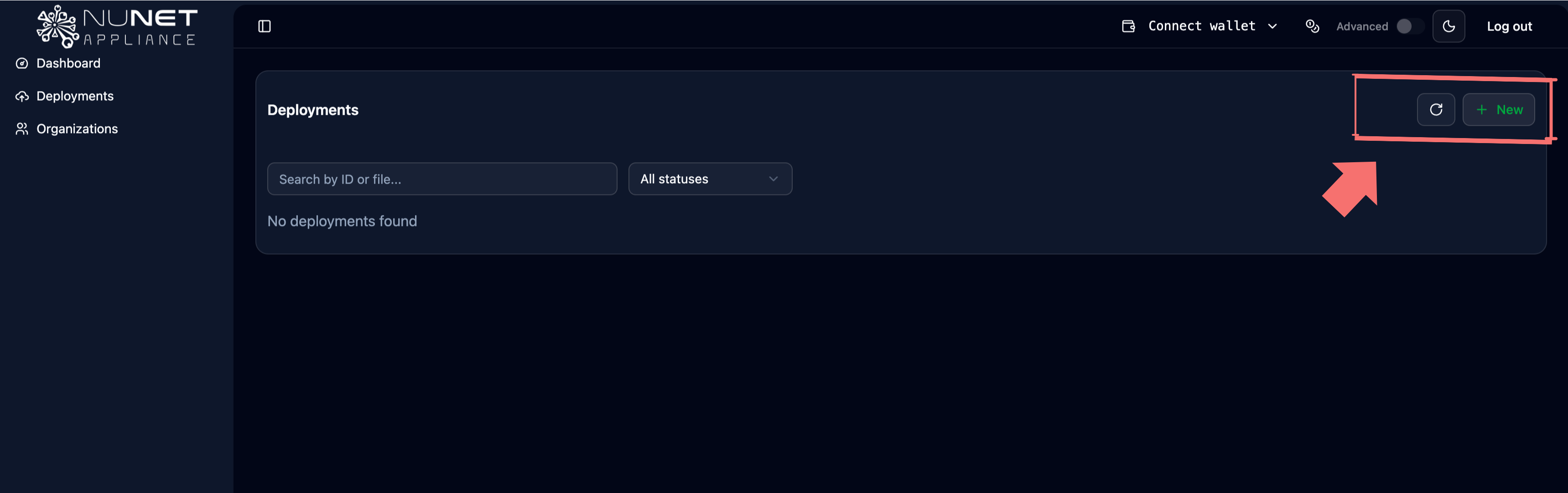
You'll see two deployment modes: Simple Mode (for pre-made templates) and Advanced Mode (for custom ensemble files). For this tutorial, we'll use Simple Mode.
Step 2: Select the Flappy Bird Ensemble
In the simple mode interface, you'll see a list of pre-made ensemble templates. Look for the Flappy Bird or Crappy Bird template in the list.
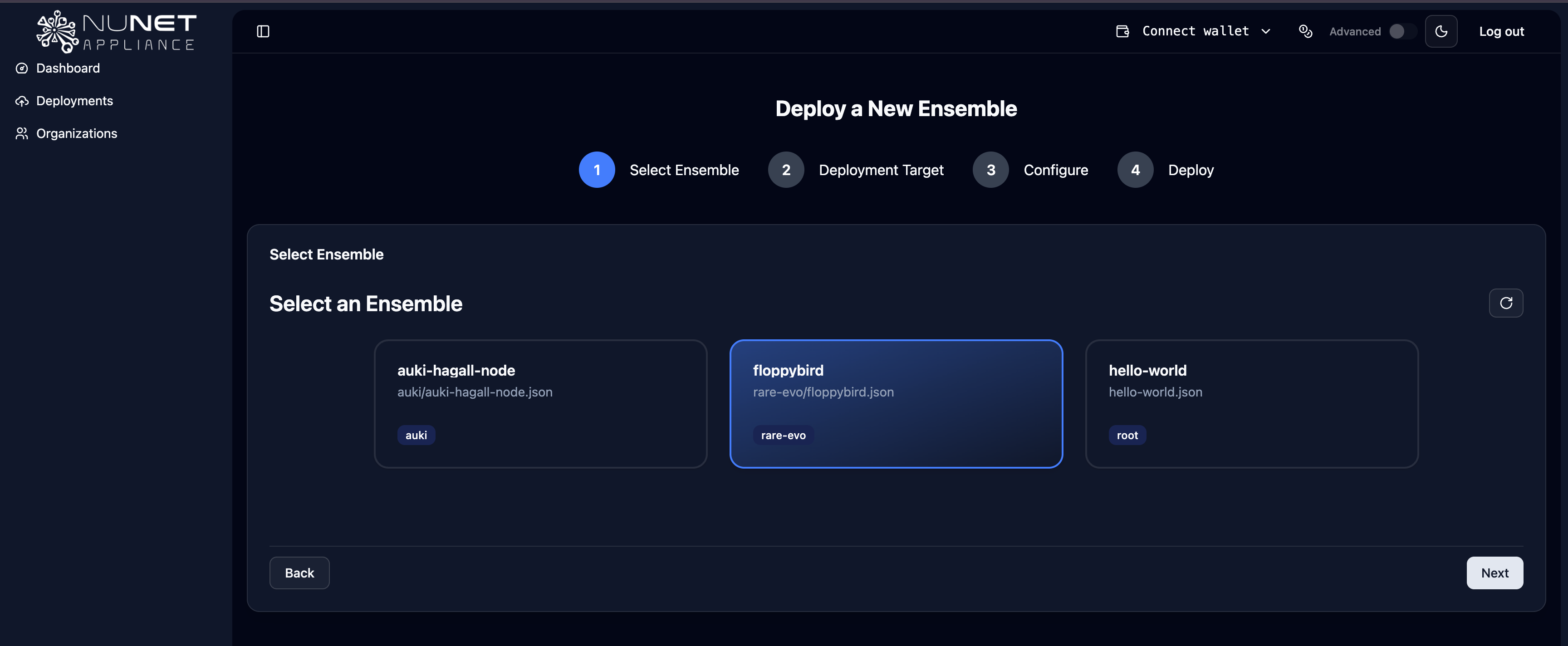
Click on the Flappy Bird template, then click Next to proceed to the deployment configuration.
Step 3: Choose Deployment Destination
You have three options for where to deploy the game:
Local Deployment
Deploy the game directly on your NuNet Appliance machine. This is the simplest option for testing and requires no additional network configuration.
- Select Local as your deployment destination
- Ensure your appliance has at least 1 CPU core and 1-2 GB RAM available
Targeted Deployment
Deploy to a specific peer on the NuNet network by their peer ID.
- Select Targeted as your deployment destination
- Enter or search for the peer ID of the machine you want to deploy to
- The target machine must be online and accessible on the network
Untargeted Deployment
Let the NuNet DMS automatically select the best available compute provider on the network.
- Select Untargeted (or Any Available) as your deployment destination
- The network will automatically match your requirements with available compute resources
For your first deployment, we recommend starting with a Local deployment to see how it works.
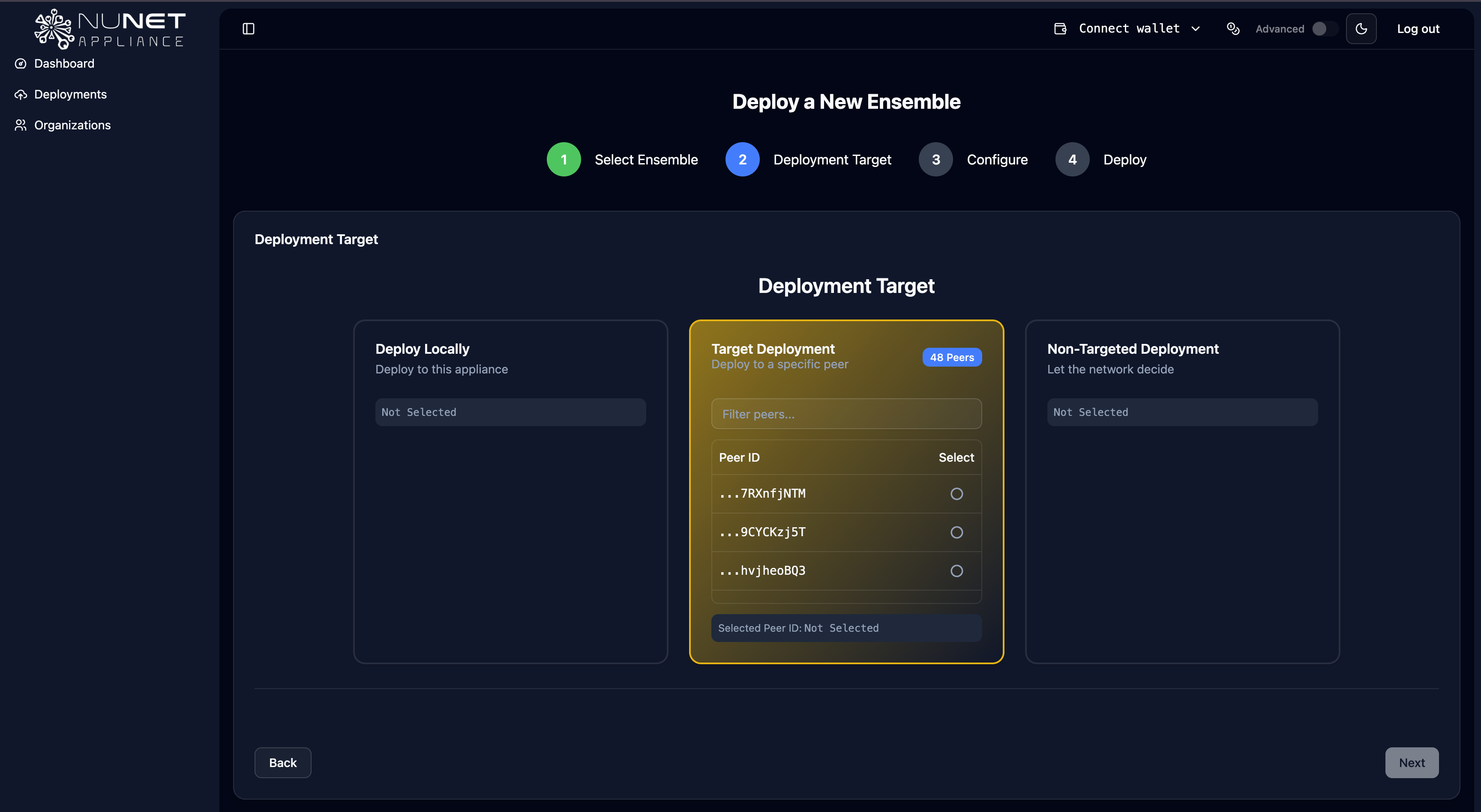
Click Next after selecting your deployment destination.
Step 4: Configure Game Parameters
The Flappy Bird ensemble uses several configurable parameters. Here's what you can adjust:
Resource Configuration
- CPU Cores (
allocations_alloc1_resources_cpu_cores): Number of CPU cores allocated (default: 1) - RAM Size (
allocations_alloc1_resources_ram_size): Memory allocation in GiB (default: 1-2) - Disk Size (
allocations_alloc1_resources_disk_size): Storage allocation in GiB (default: 1-2)
Game Configuration
- Bird Color (
bird_color): The color of your bird in the game (e.g., "red", "blue", "yellow") - DNS Name (
dns_name): The hostname where your game will be accessible - Proxy Port (
proxy_port): The port number for the DMS proxy (typically auto-configured)
Network Configuration
- Peer ID (
peer_id): Required for targeted deployments - the peer ID of the target machine
The UI will show you which parameters are required (marked with an asterisk or highlighted) and which are optional. For a basic deployment, you can use the default values, but feel free to customize:
- Set a memorable DNS name for easy access (e.g., "my-flappy-bird")
- Choose your favorite bird color
- Adjust resources if you want to ensure better performance
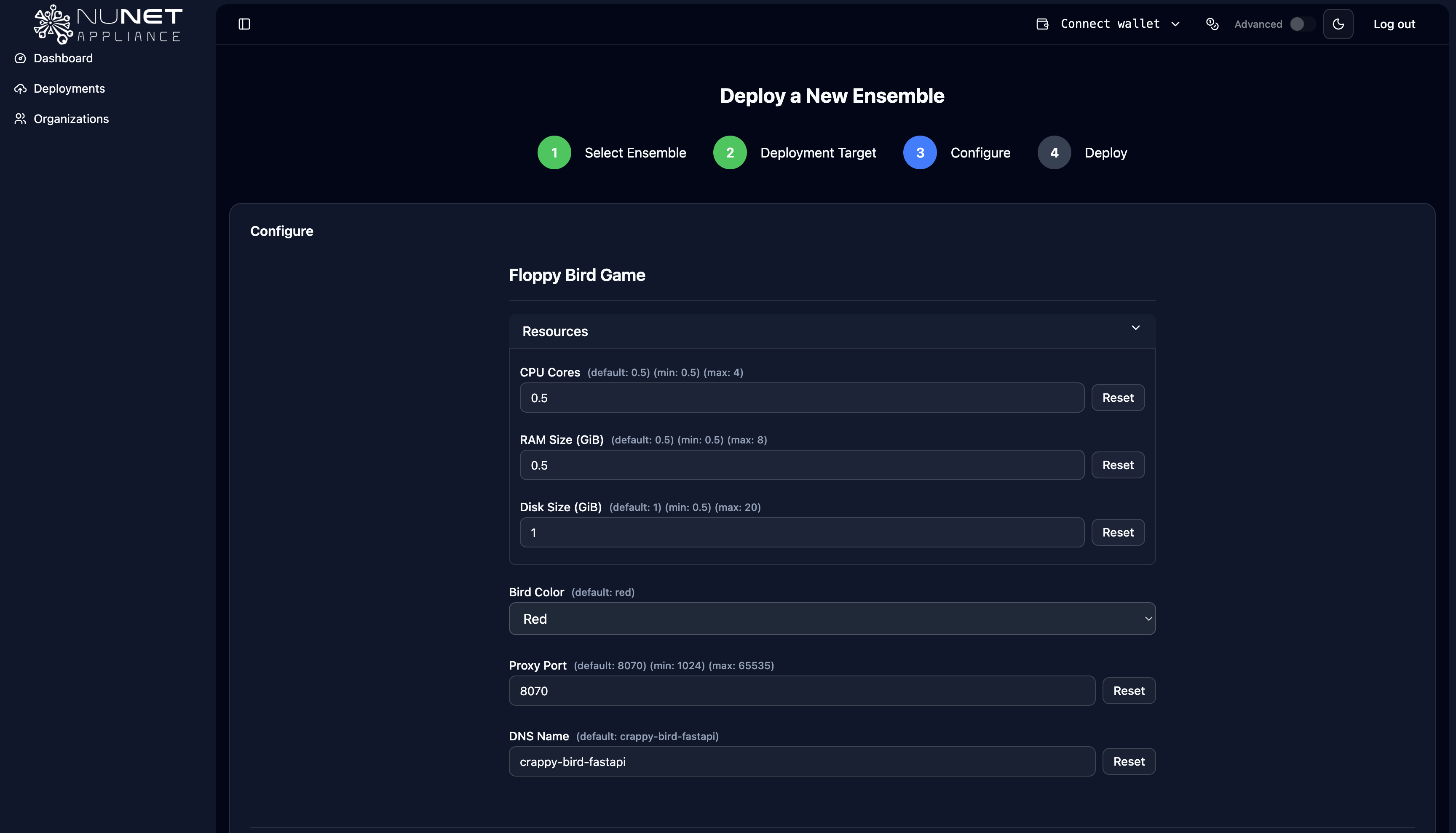
Once you've adjusted the parameters to your liking, click Next to proceed.
Step 5: Preview and Deploy
Before finalizing, you'll see a preview of your deployment configuration. This shows:
- The ensemble structure
- Resource allocations
- Configuration parameters
- Deployment destination
Review the preview to ensure everything looks correct. The preview will show the processed ensemble file with your parameter values filled in.
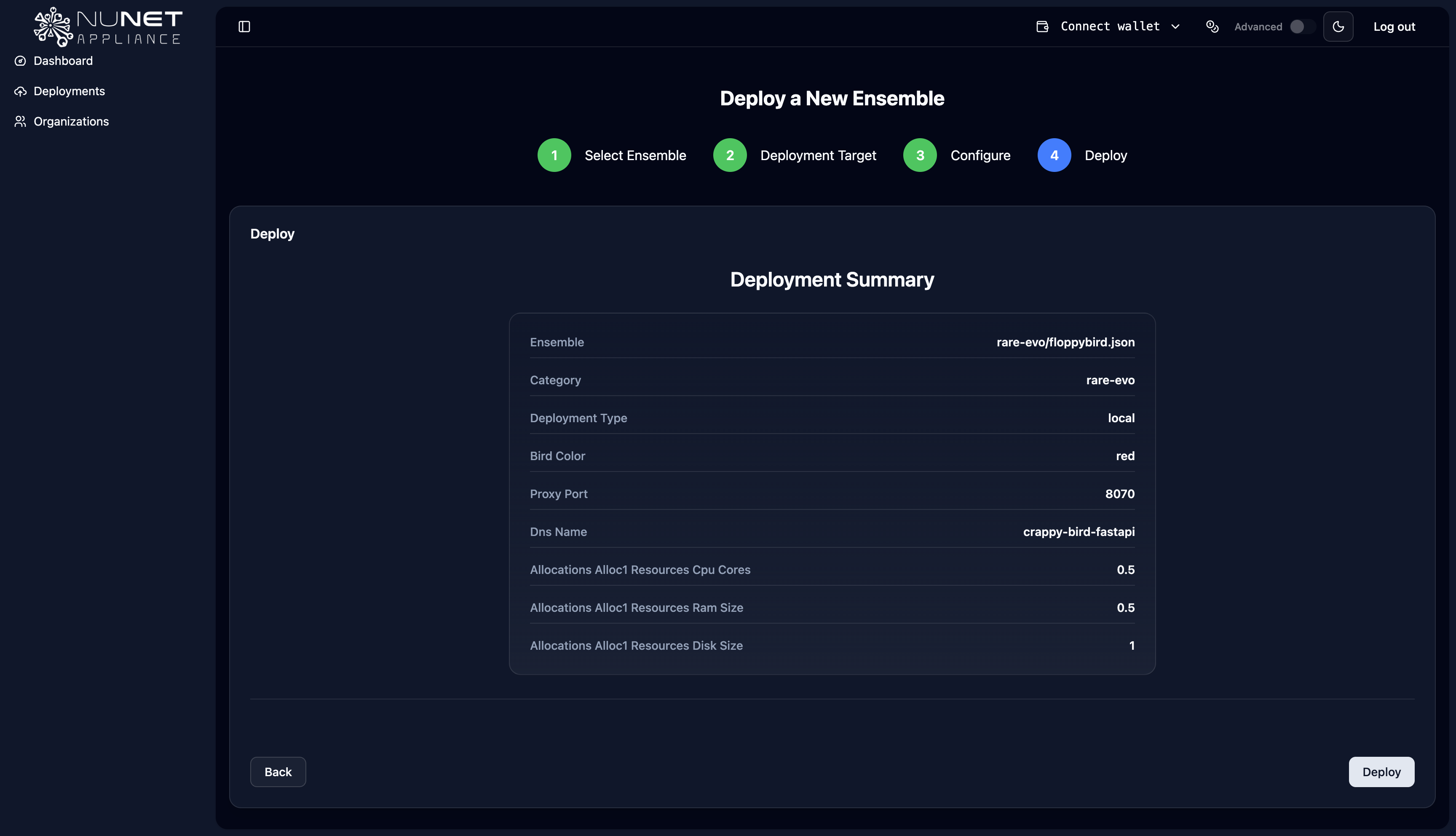
If everything looks good, click Deploy to start the deployment process.
Step 6: Monitor Deployment
After clicking Deploy, you'll be redirected to the deployment status page where you can monitor the progress. The deployment process involves:
- Resource Matching - NuNet DMS finds suitable compute resources
- Container Pull - The Flappy Bird Docker image is downloaded
- Container Start - The game container is launched
- Service Initialization - The game service becomes ready
You'll see real-time status updates, and once the deployment is complete, you'll receive:
- The game's access URL
- Deployment status (Running/Stopped)
- Resource usage information
- Log output (thanks to the
forwardStdoutconfiguration in the ensemble)
Accessing the Game
Once deployment is complete, you can access the Flappy Bird game through:
- The DNS name you configured (if using DMS proxy)
- The direct URL provided in the deployment status
- The peer's network address (for remote deployments)
Simply open the provided URL in your web browser to start playing!
Understanding the Ensemble File
While you deployed via the UI, it's helpful to understand what's happening behind the scenes. The Flappy Bird ensemble file defines:
version: "V1"

allocations:
    alloc1:
        type: service
        executor: docker
        resources:
            cpu:
                cores: {{ allocations_alloc1_resources_cpu_cores }}
            ram:
                size: {{ allocations_alloc1_resources_ram_size }} # in GiB
            disk:
                size: {{ allocations_alloc1_resources_disk_size }} # in GiB
        execution:
            type: docker
            image: registry.gitlab.com/nunet/solutions/crappybird:v0.5.4
            environment:
              - DMS_REQUIRE_PROXY=true
              - DMS_PROXY_PORT={{ proxy_port }}
              - DMS_DDNS_URL=true
              - BIRD_COLOR={{ bird_color }}
        dnsname: {{ dns_name }}
        forwardStdout: true
        stdoutLabels: ["crappybird", "demo"]
        stdoutPrefix: "[DMS] "

nodes:
    node1:
        allocations:
            - alloc1
        peer: {{ peer_id }}
Key features of this ensemble:
- Service type allocation - Runs as a long-running service (not a one-time task)
- Docker execution - Uses the official NuNet Flappy Bird container image
- Real-time logging -
forwardStdout: trueenables live log streaming - DMS proxy integration - Automatically sets up network access via DMS proxy
- Customizable parameters - All the values you configured in the UI
Troubleshooting
If you encounter issues during deployment:
Deployment Fails to Start
- Check resource availability - Ensure your target machine has sufficient CPU, RAM, and disk space
- Verify network connectivity - For remote deployments, ensure the target peer is online
- Check logs - Review the deployment logs for specific error messages
Game Not Accessible
- Verify DNS name - Ensure the DNS name is correctly configured and accessible
- Check proxy status - The DMS proxy must be running for the game to be accessible
- Firewall settings - Ensure necessary ports are open (though DMS proxy typically handles this)
Container Issues
- Image pull failures - Check internet connectivity and Docker registry access
- Container crashes - Review the stdout logs (available in the deployment status page)
- Resource constraints - Increase allocated resources if the game is unstable
Summary
Congratulations! You've successfully deployed Flappy Bird on the NuNet Appliance. In this tutorial, you learned how to:
- Access the deployment interface through the NuNet Appliance UI
- Select a pre-made ensemble template (Flappy Bird) from the simple mode
- Choose a deployment destination (local, targeted, or untargeted)
- Configure deployment parameters including resources, game settings, and network options
- Preview and deploy the ensemble
- Monitor and access your deployed game
The Flappy Bird deployment demonstrates core NuNet concepts:
- Ensemble-based deployments - Defining applications as resource allocations
- Container execution - Running Docker containers on the decentralized network
- Resource management - Allocating CPU, RAM, and disk resources
- Network integration - Using DMS proxy for service accessibility
- Real-time monitoring - Viewing logs and deployment status
This same process applies to deploying any ensemble on NuNet, whether it's a game, AI model, web service, or any other containerized application. You can explore other pre-made templates or create custom ensembles for your own applications.
Next Steps
- Learn about creating custom ensembles for your own applications
- Review the capabilities to understand what's possible